
How to Create an Effective Explainer Video for Your Business

Are you looking for an effective way to communicate your brand's message to your audience? Look no further than explainer videos! These short, engaging videos have become a popular tool for businesses to explain complex ideas in a simple and entertaining way. Plus, explainer videos can also be done in a budget! In this blog, we'll dive into everything you need to know to make an effective explainer video that suits your needs.
Understanding how to create an explainer video becomes critical when you want to communicate your product clearly without relying on long-form content or repeated explanations. This is especially relevant to explainer videos for startups, where clear, concise communication directly impacts understanding and adoption. One of the first steps in this process is choosing the right format, as it directly influences how effectively your message is presented and understood.
Selecting the Right Type of Explainer Video
Explainer videos come in a variety of types, each suited to different purposes and audiences. Choosing the right type of explainer video is crucial for businesses to effectively communicate their message to their target audience.
The most common types of explainer videos include:
Animated Explainer Videos
These videos use animation and graphics to explain a product or service. They can be highly effective in simplifying complex concepts and keeping viewers engaged. Different animated treatments such as whiteboard, cut-outs, and motion graphics can be used to create different effects:
Whiteboard
Whiteboard animation is a popular animation technique where a hand draws out illustrations and text on a whiteboard. This creates a visually engaging and dynamic video. This treatment can be highly effective for explaining complex ideas or concepts and is often used for educational concepts or product demonstrations. For example, a company that offers software solutions may use whiteboard animation to create explainer videos that explains how their product works. The video may show the software's key features, with the artist drawing images and text on the whiteboard to illustrate the concepts.

Cut-out
Cut-out animation involves animating characters and objects cut out from paper or card. It's a unique and eye-catching technique that can be highly effective in capturing attention. This technique is often used in explainer videos for children's products or services, as it has a playful and whimsical feel that can capture their attention. For instance, a toy company may use cut - out animation to create an explainer video for a new product line aimed at children. The video may feature brightly coloured cut-out characters that move across the screen, interacting with the toys and demonstrating their features.

Source - school.mangoanimate.com
Motion Graphics
Motion graphics use moving text, graphics, music and voice-over to create a visually interesting video. They're a great way to showcase data and statistics in an engaging way. This treatment is commonly used in explainer videos for startups or organizations looking to showcase data or statistics in a visually engaging way. It can also be effective for introducing new products or services. A financial institution may use motion graphics to create an animation video explainer about their investment products. The video may include charts and graphs that illustrate the performance of various funds, with animated elements that highlight key data points. The animation could also include a voiceover that explains how the products work and what benefits they offer to investors.
Take a look at the educational video production we did for our client, DSP Mutual Fund in a shoot in Mumbai, where we incorporated motion graphics in certain sections to enhance the content.

Live-Action Explainer Videos
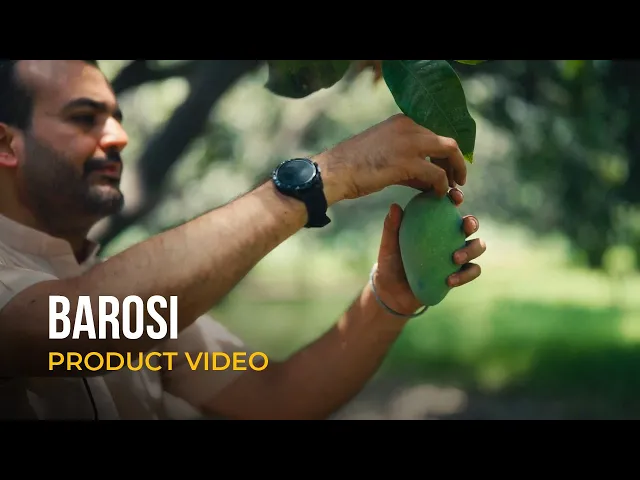
Live-action explainer videos use actors or real people to demonstrate a product or service. These videos can be highly effective in building trust and credibility with viewers. These videos are often used by service-based businesses to build trust with potential clients. For example, in this product video shoot for our client Barosi, the founder provided a detailed explanation of the manufacturing process for their pickle products.
Screencast Explainer Videos
Screencast explainer videos are a simple and cost-effective way to explain software or digital products. They use screen recording software to capture a step-by-step process.
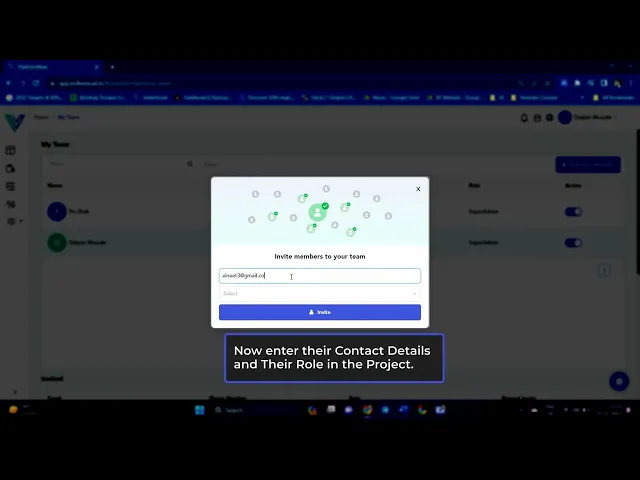
Take a look at the screencast explainer video demonstrating how to add team members as a creator on MediaFlow, our project management platform for video production.
It's important to consider the nature of the product or service, the intended audience, and the message to be conveyed when deciding on the type of explainer video to use.
AI-Generated Explainer Videos
AI videos are emerging as a practical format for creating explainer content, especially when the narrative involves multiple contexts, timelines, or abstract concepts. Instead of relying on traditional shoots or extensive production setups, AI allows teams to visualise ideas quickly while maintaining consistency in style and storytelling.
This approach is particularly useful when the story requires visualising concepts that are otherwise difficult or resource-heavy to produce. It also helps streamline timelines and production effort, making it easier to execute complex narratives without compromising on clarity or engagement.
For instance, in a brand film that we created for DSP Mutual Fund, we used AI visuals to tell a story spanning a century of investing. The narrative moved through key financial moments, from the Great Bull Market of the 1920s to the Great Depression, and the emergence of Benjamin Graham’s investment principles.

Using Stock Videos
Using Indian stock footage in explainer videos can be an effective way to add visual interest and depth to your video without breaking the bank. Stock footage refers to pre-existing video clips that can be licensed for use in your video.
One of the biggest benefits of using stock footage is that it can save you time and money. Instead of having to shoot new footage or create animations from scratch, you can simply license existing footage that fits your needs.
Check out the ad film we made for our client, Adishtu, where we utilized stock footage in the initial shots.

There are many stock footage websites available online where you can find footage on almost any topic imaginable. This can be particularly helpful if you need to incorporate footage that you don't have access to yourself.
When using stock footage, it's important to choose footage that is high quality and relevant to your message. You also want to make sure that the footage fits seamlessly into your overall video, both in terms of visual style and content.
Steps to Create an Effective Explainer Video
Creating an explainer video requires clarity in message, structure, and execution. Knowing how to create a good explainer video for business comes down to simplifying the idea and presenting it in a way that is easy to understand.
Define the objective
Start by identifying what the video needs to achieve. Whether it is explaining a product, onboarding users, or driving conversions, the objective defines the direction.
Script the message
The script defines how clearly the idea is communicated. Strong explainer video script writing focuses on keeping the message concise, structured, and easy to follow, without adding unnecessary detail.
Storyboarding
Storyboarding involves planning the visuals and deciding how the product or service will be presented. The format, whether live action, animation, or screen-based, should support the message and make it easier to understand.
Choosing the right music and voice-over
Music sets the tone of the video and helps maintain engagement. The music should align with the overall tone of the content. Use royalty-free music to avoid legal issues.
The voice-over plays an equally important role in delivering the message. The voice-over should reflect the intent of the video. A professional voice-over artist ensures clarity, consistency, and better audio quality. A reliable video production house can help source the right talent.
Lastly, keep it concise. The delivery should be direct and easy to follow.
Production and execution
This includes filming, animation, editing, and sound design, all aligned with the script and visuals. Working with a video production company ensures that each stage is executed efficiently.
Distribution and use
Once created, the video should be used across platforms such as websites, ads, and presentations to maximise impact.
What Makes an Explainer Video Effective?
An explainer video is only as effective as its ability to communicate clearly. It is not just about visual quality, but how well the message is structured, prioritised, and delivered. A well-defined explainer video production process ensures that each of these elements is planned and executed correctly.
Clarity of message
The viewer should understand what the product does within the first few seconds. There should be no ambiguity about the core offering.Strong structure
The flow should move logically from problem to solution, making it easy to follow without requiring interpretation.Keep the message focused
Avoid trying to communicate everything at once. A single, clear idea improves understanding and recall.Balanced pacing and length
If the video moves too quickly, information is missed. If it is too slow, attention drops. Keeping it concise helps maintain engagement.Alignment of visuals and audio
Visuals and voiceover should reinforce the same message. What is shown should directly support what is being said.Prioritise clarity over visuals
Design, animation, and style should support understanding, not distract from the message.Start with the core value
The most important information should come early, helping viewers quickly understand relevance.Optimise for platform
Adapt the format, length, and style based on where the video will be used.
When Businesses Should Use Explainer Videos
There are several use cases where explainer videos work especially well, particularly when businesses need to communicate clearly and reduce the effort required for users to understand their offering.
Product launches
When introducing a new product or feature, that needs quick and clear explanation.Landing pages
To reduce drop-offs by answering key questions upfront and helping users understand the offering faster.Performance marketing campaigns
When you need to communicate value within the first few seconds to capture attention and drive action.User onboarding
To guide new users without relying on lengthy documentation or multiple instructions.Complex products or services
When the offering is not immediately easy to understand and requires a structured explanation.
How Explainer Videos Work from a Viewer Psychology Perspective
The psychology of explainer videos is a fascinating area that can help businesses make their videos more persuasive and effective. Here are some cognitive principles that can be used to create more compelling explainer videos:
Attention: The human brain has a limited attention span, so it's important to grab the viewer's attention quickly. This need for quick engagement has led to the rise of 30-second explainer videos among brands. Use attention-grabbing visuals and engaging music to draw viewers in and make them want to watch the video. For example, in an explainer video for a new mobile app, starting the video with a dynamic visual of the app's user interface and playing upbeat background music can help grab the viewer's attention within the first few seconds.
Memory: People are more likely to remember information that's presented visually and verbally. Use a combination of text, images, and voice-overs to help viewers retain information. For example, in an explainer video for a cooking class, using a combination of text, images, and voice-over to explain the steps of a recipe, will help viewers remember the instructions.
Emotion: Emotions play a powerful role in decision-making, so it's important to create an emotional connection with viewers. Use stories, humour, or other emotional triggers to make viewers feel invested in the video's message. For example, in an explainer video for a charity organization, telling a story about someone who was helped by the organization's work, will create an emotional connection with viewers and make them feel invested in the cause.
Social Proof: People are more likely to trust a product or service if they see others using it. Incorporate customer testimonials videos or other forms of social proof to demonstrate the value of your offerings. For example, in an explainer video for a new fitness program, including testimonials from people who have successfully completed the program and achieved their fitness goals, will demonstrate the value of the program and encourage viewers to sign up.
Call-to-Action: A clear call-to-action at the end of the video can help viewers take the next step. Use phrases like "sign up now" or "learn more" to encourage viewers to engage with your brand.
By understanding the psychology behind how people consume and process information, businesses can create explainer videos that are more persuasive and effective. Utilizing these cognitive principles can help ensure that your video resonates with viewers and drives results for your business.
An effective explainer video production requires a thoughtful approach that focuses on the audience, the message, and the visuals. By identifying the key points, using storytelling techniques, and keeping it simple, you can create a video that is engaging, memorable, and persuasive. Don't forget to also pay attention to the details such as the script, voice-over, and animation to ensure a polished final product.